> For the complete documentation index, see [llms.txt](https://docs.xorosoft.com/llms.txt). Markdown versions of documentation pages are available by appending `.md` to page URLs; this page is available as [Markdown](https://docs.xorosoft.com/whats-new/release-notes/previous-releases/2025/june-2025-release.md).
# June 2025 Release
{% hint style="warning" %}
**This is a Custom Release. Feature availability depends on configuration and rollout status. Some features listed above may not be visible in your environment if they are part of a staged or custom deployment. Please contact your support representative to confirm enablement.**
{% endhint %}
### Void Functionality for Cycle Count Detail Line
This release introduces the ability to void individual cycle count detail lines directly from the Cycle Count Entry module. A new delete button has been added under the "Action" column to each detail line within the Cycle Count Entry screen, enabling users to mark a line as void. The line is removed from the current cycle count but can be added again in a future cycle count if needed.
### New Columns Added to Invoice Centre
We have added two new columns, "Unit Cost" and "Ship Date" to the detail view in the Invoice Centre.
### New Option to Manage Unavailable Quantities in Sales Orders
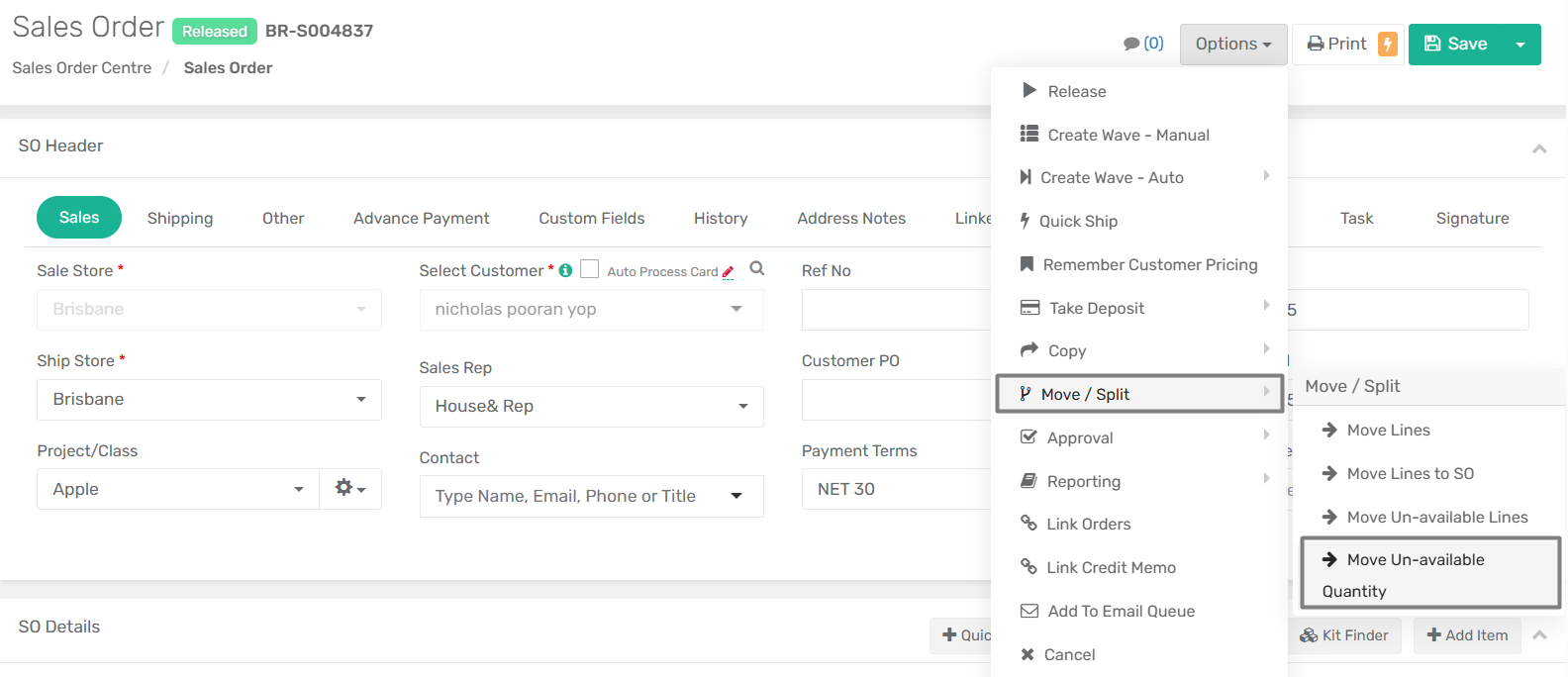
A new option, **Move Un-available Lines**, has been introduced under **Options > Move/Split** option in the Sales Order module to improve handling of partially fulfillable orders. This feature allows users to automatically transfer the unavailable quantity from each sales order line to a new Sales Order.
When the Move Un-available Lines option is selected, the system prompts the user with a confirmation dialog. Within the confirmation dialog, users can also select an alternate store to be assigned to the new Sales Order.
***Important: Please note that if the original sales order contains only one line item and that item is fully unavailable, the original sales order is cancelled after the move is completed.***
### **New Columns Added for Linked and Not Linked Quantities in Sales Order Module**
We have added two new columns to the Sales Order module at the item details level, providing enhanced visibility into linked and not-linked quantities for each item. These additions enhance inventory tracking by offering more detailed insights into the status of linked and unlinked quantities in sales orders.
**Feature Details**
The following columns has been added to the sales order module:
* **Active Linked Qty:** This column displays the calculated active linked quantity. It's determined by the following formula:
* `Active Linked Qty = Total Linked Qty - Linked Qty Received`
* "Total Linked Qty" is equivalent to the existing "Linked Qty" field.
* **Not Linked Qty:** This column displays the calculated not-linked quantity. It's determined by the following formula:
* `Not Linked Qty = Remaining to Ship - Qty Allocated - Active Linked Qty`
### **Enhanced Visibility for Inactive Entities in Global Search**
We have improved the global search with this release to quickly identify and differentiate inactive records from active ones. Now, when you perform a global search, the inactive entities, such as customer, vendor, items, accounts, etc. will be highlighted in red.
### "Net Available" Column Added to Item Subform
We have added "Net Available" column within the Inventory tab of the item subform. This column displays the quantity of an item that is truly available for new orders or allocations. "Net Available" is calculated as: **Available Quantity - Quantity To Pick.**
### Added Vendor Data Export and Import/Export Utility Capability
We have enhanced the Data Export Centre by adding a Vendor View, allowing you to easily export detailed vendor information for reporting and analysis.
Additionally, Vendor has now been included in the Import/Export Utility module. This enables you to create, manage, and update vendor data efficiently through bulk import and export processes.
### Auto Email Notification on Marking Invoice As Shipped
We have introduced a new app config titled **"Automatically Send Ship Confirmation Email When Invoice Is Marked As Shipped"** under the Sales tab. If this setting is enabled, an email notification is automatically sent to the customer once the order is marked as shipped. You can manage the content of this email through the Email Templates module.
### Updated Permission Requirements for Voiding Sales Orders
Previously, sales orders with the status *Cancelled* required special permission to be voided. With this enhancement, *Cancelled* status sales orders can now be voided **without requiring additional permissions**, aligning their behavior with sales orders in *Open* status.
All other sales order statuses continue to require appropriate permissions to perform the void action.
### Enhanced Handling of Deposit Refunds with Sales Order Mapping
We have introduced a new app config "**Enable Sales Order and Customer Refund Mapping**" that allows you to enable or disable the new deposit refund mapping functionality. When enabled, the system will permit refunds of remaining deposit amounts even if the deposit is linked to another sales order.
### Improved Wave Number Display in Invoice Centre
Enhancements have been made to the way **Wave Numbers** are displayed in the **Invoice Centre** to provide more accurate and relevant shipment tracking information at both the header and detail levels.
**Feature Details**
* **Invoice Header - Wave Numbers Column:**\
If there are multiple waves generated for a sales order, the "Wave Numbers" column now displays **only the wave** that has been **shipped** specifically for that invoice.
* **Invoice Detail - New Wave Number Column:**\
A new **Wave Number** column has been added to the **Invoice Detail** section within Invoice Centre.
### Added Decimal Rounding Options in Custom Pride Formula Profile
We have introduced additional precision control for decimal rounding in the Custom Price Formula Profile. Users can now select "Up to 2 decimal places" and "Up to 4 decimal places" as new rounding options.
### New App Config **for Automatic Item Description Updates**
A new multi-select dropdown app config, **"Select Item Type for Auto Item Description Update in Existing SO, PO, and BOM"**, has been added. This config works in conjunction with the existing "Allow Item Description Updates on SO and PO" setting. You can now choose description of which item types are automatically updated: Inventory Items, Other Item (Non-Inventory, Labor, and Service), or both.
### Adjustment Account Selection in Inventory Write-Off
A new **“Adjustment Account”** dropdown has been added to the **Write-off** popup in the **Inventory by Location** module. The item's **default adjustment account** will be pre-populated automatically. Users can **change the account** as needed before completing the write-off. If no account is selected manually, the system will default to the item's preset adjustment account.
### **Enhancements to Customer Module – Email Configuration & Priority Handling**
***
**Overview**
In our continued effort to enhance communication flexibility within XoroERP, the **Customer Module** has been upgraded with new email field configurations, improved control over email recipients, and a streamlined logic for sending system-generated and manual emails. These changes empower users to define recipient lists for specific transactional events, eliminate dependency on a single contact field, and bring clarity to outbound communication workflows.
***
**What’s New?**
**1. Five Dedicated Email Input Fields**
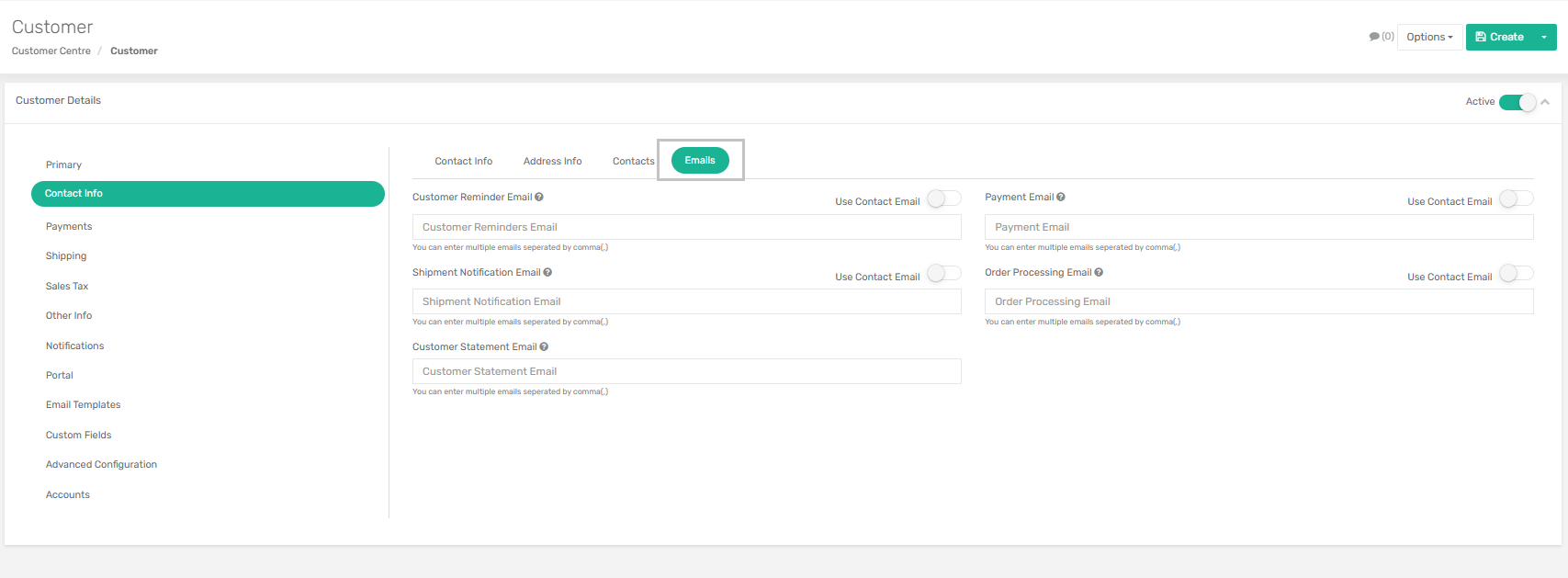
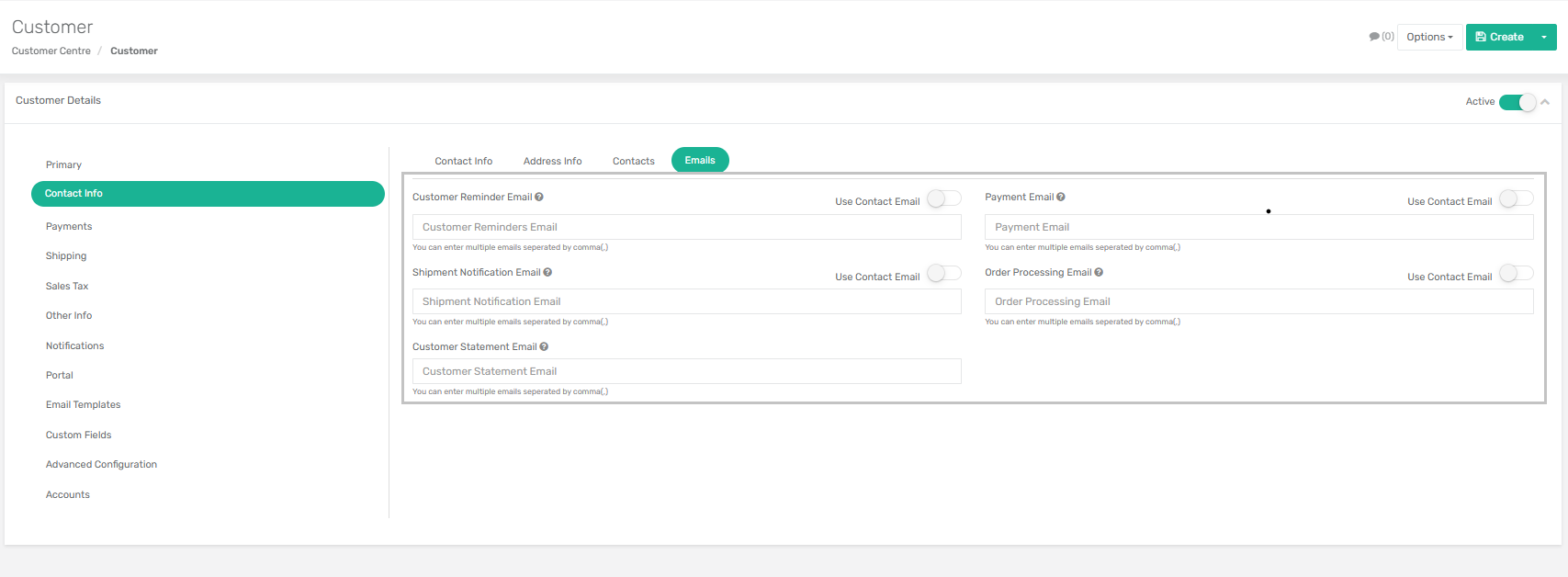
To better categorize and direct outbound communications, five distinct email fields have been added to the **Customer → Contact Info → Emails Tab**. Each field is associated with a specific operational context:
* **Customer Reminder Email**\
For invoice reminders, payment due alerts, and overdue notifications.
* **Customer Payment Email**\
Used in cases like payment acknowledgements, deposit emails, and payment link dispatches.
* **Customer Shipment Email**\
Specifically for shipment confirmation emails, notifying customers of dispatched orders.
* **Customer Order Processing Email**\
Triggers during various sales order workflows like order release, estimate approval, pack and hold release, order cancellation, and wave allocation.
* **Customer Statement Email**\
Handles scheduled or on-demand dispatches of customer statements.
{% hint style="warning" %}
Each of these fields accepts **multiple comma-separated email addresses**, offering flexibility for businesses that need to notify multiple stakeholders per transaction.
{% endhint %}
***
**2. “Use Contact Email” Toggle – Added Control**
Next to each of the above fields is a **toggle switch** labeled **“Use Contact Email”**. This setting determines whether or not the system should include the email address of the contact associated with the order or invoice.
* **When Enabled (ON):**\
The system appends the **Contact Email** to the list of recipients defined in the specific email field. This ensures that both **default customer contacts and dynamic order-specific contacts** are informed.
* **When Disabled (OFF):**\
Only the email addresses specified in the input field are used. This gives users precise control over who receives which communication.
* **Fallback Logic:**\
If both the input field is left **blank** and the toggle is set to **OFF**, the system reverts to the **legacy behavior**, using the main contact email of the customer.
***
**3. Visibility in Customer Centre**
To enhance visibility and make recipient tracking easier for customer-facing teams, all five new email fields have been added as **visible columns** in the **Customer Centre**. Users can now view, sort, and verify email configurations at a glance without drilling into individual records.
***
**Functional Mapping – When Are These Emails Used?**
Each of the five fields has been mapped to specific ERP activities:
| Email Field | Triggered In These Scenarios |
| ----------------------------------- | ---------------------------------------------------------------------------------------------------------------------------------- |
| **Customer Reminder Email** |
- Overdue Reminder - Due Reminder - Daily Invoice Reminder
- Order Release - Estimate Approval - Pack and Hold Release - Order Cancellation - Wave Allocation (Linked SOs)
|
| **Customer Statement Email** |
- Monthly Statements - On-demand Statement Emails
|
***
**Email Priority Logic**
To ensure clarity and control, the following rules govern how the system selects recipients:
* **Primary Preference**: Emails listed in the specific input fields.
* **If “Use Contact Email” = ON**:\
→ The system uses both:
* Email(s) in the input field
* Contact Email from the corresponding Order/Invoice
* **If “Use Contact Email” = OFF and Field is Empty**:\
→ System reverts to the default behavior using the customer’s main email address.
* **Special Case – Customer Statement Email**:\
→ Priority Order:
1. Input Field
2. If empty, fallback to **Customer Main Email**
This logic ensures that communications are never unintentionally missed while providing full autonomy over recipient selection.
**Manual Email Queue – Priority Compliance**
The same rules apply when emails are sent manually via the **Email Queue**. This ensures consistent behavior regardless of whether the email is system-generated or manually triggered.
### **Notes Feature in B2B Cart**
**Overview**
To enhance communication and order personalization in the B2B ordering experience, a new **Notes feature** has been introduced at the **line-item level** within the B2B Cart. This allows users to input specific instructions or remarks related to individual products before submitting an order.
***
**Feature Details**
* **Notes Button on Each Cart Item:**\
Each item listed in the cart now displays a **“Notes”** option.
* **Interactive Textbox for Input:**\
Clicking the "Notes" option opens a **textbox**, where users can **enter or edit** notes specific to that item.
* **Persistent & Editable Notes:**\
Once a note is saved, it is **displayed alongside the item** and can be **edited anytime** before order submission by clicking on it again.
* **Integration with Sales Order:**\
Upon **order submission**, all saved notes are **automatically included** at the **line-item level** in the **generated Sales Order** within XoroERP.
By capturing these details early in the order process, this enhancement improves **order accuracy**, **customer satisfaction**, and **operational efficiency**.
### **Quick Add and Remove Functionality in Create ASN Module**
**Overview**
To streamline the ASN creation process and improve user efficiency, a new **"Quick Add"** button has been introduced in the **Create ASN** screen under **Purchase Orders**, along with a **Remove** button for easier item management.
**Enhancement Details**
* **Quick Add Button in Create ASN Screen:**\
A new **“Quick Add”** button has been added to the **Purchase Orders** section of the **Create ASN** module.
* **Functionality Logic:**\
The button functions using the **same logic as the "Quick Add" in the Shipment Delivery** module. It allows users to rapidly add multiple line items from the PO to the ASN without needing to add them individually, manually.
* **Remove Button:**\
A **“Remove”** button is also introduced alongside each line, giving users the ability to **easily delete** any added line from the ASN draft before finalizing.
### **Batch Reconcile Option in Item Receipt and Bill Centre**
**Overview**
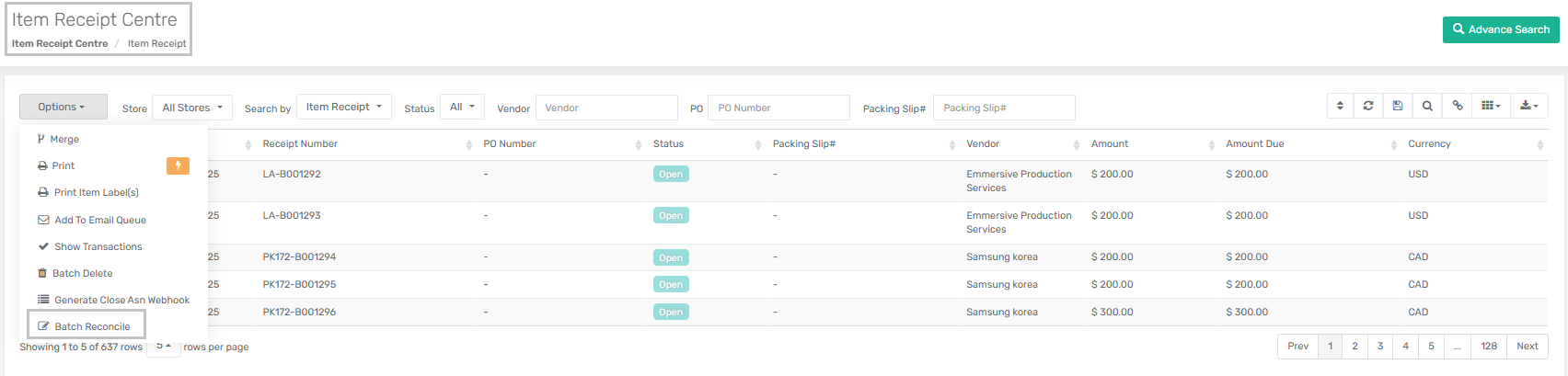
A new option titled **"Batch Reconcile"** has been added to both the **Item Receipt Centre** and **Bill Centre** to allow users to reconcile multiple documents simultaneously.
**Feature Details:**
* **Batch Reconcile Functionality:**\
Users can now select and reconcile **multiple Item Receipts (IRs)** or **Bills** in a single action, improving processing efficiency.
{% hint style="warning" %}
The system enforces a validation that **all selected records must belong to the same Vendor**. If the vendor differs across selected IRs or Bills, the batch reconciliation will be disallowed, and the user will be prompted accordingly.
{% endhint %}
***
**Technical Implications:**
* The batch action triggers backend reconciliation logic for each selected IR/Bill record.
* Backend validation checks for vendor consistency across selected rows before processing.
* This update reduces manual effort and ensures consistency in multi-document reconciliation operations.
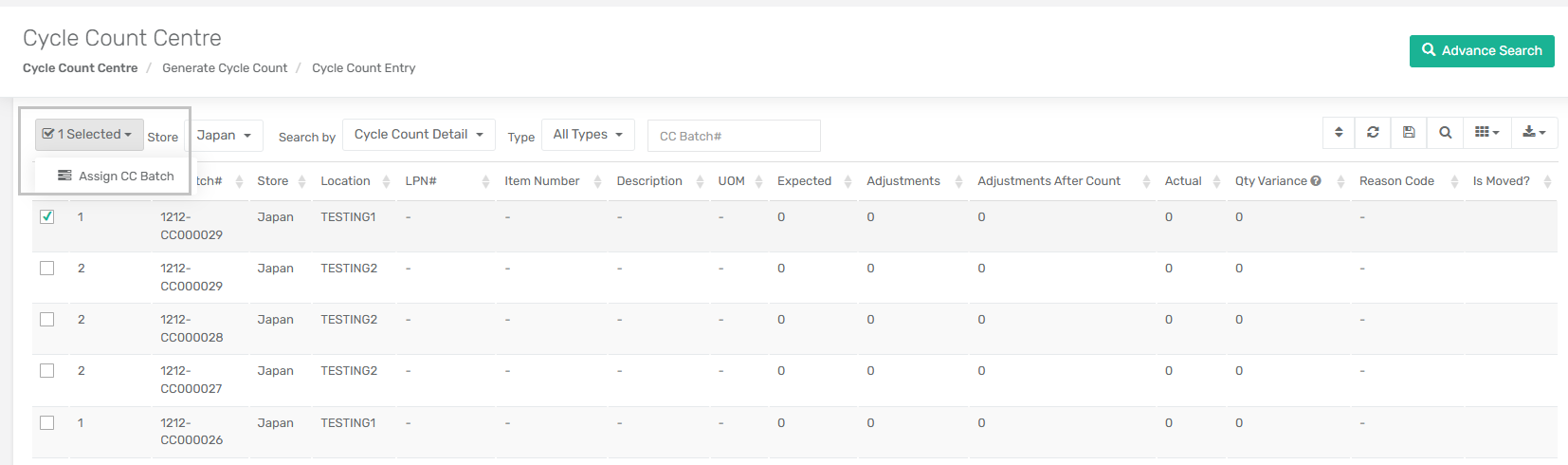
### **New Feature – "Assign CC Batch" in Cycle Count Module**
**Overview**
A new functionality titled **"Assign CC Batch"** has been added to both the **Cycle Count Centre** and the associated **detail sub-form**. This enhancement enables administrators to assign specific users to pending inventory count batches for improved accountability and workflow management.
***
**Key Enhancements**
**1. User Assignment at Header Level**
* The **"Assign CC Batch"** option is now available at the header level of a Cycle Count Batch.
* When used, it assigns the selected user to all **uncounted detail lines** within the batch.
* This reduces manual assignment effort and ensures consistency across all open line items.
**2. Batch Eligibility Filtering**
* Batches that are in **Accepted** or **Void** status are automatically **excluded** from assignment selection.
* This ensures only active and countable batches are impacted by the assignment process.
**3. Display of Assigned Users**
* A new field, **"Assigned Users"**, has been added to the Cycle Count grid view.
* This field displays a **comma-separated list** of users currently assigned to each batch, improving transparency and monitoring.
***
**Sub-Form Enhancements**
**User Assignment in Detail View**
* When the **"Assign"** action is triggered, a confirmation dialog appears allowing the user to select a team member from the list.
* Once confirmed, the user is applied to all uncounted detail lines of that batch.
**Summary Table**
| Area Affected | Description of Change |
| --------------------- | ------------------------------------------------------- |
| Cycle Count Header | "Assign User" feature added for batch-level assignment |
| Detail Sub-Form | Confirmation pop-up and user dropdown for assignment |
| Grid View | New "Assigned Users" column added |
| Batch Selection Logic | Accepted and Void batches excluded from assignable list |
## WMS ENHANCEMENT
### **New Inventory Adjustment Module in WMS**
We have introduced a new module **Inventory Adjustment** within the WMS system. This module allows you to adjust inventory of single or multiple items to single or multiple LPN#/Locations.
To know more about this module, click [here](https://app.gitbook.com/o/Io6LXfHxKCbW4ooKqqMR/s/kf8DNCjEfcSm64PCPcmf/~/changes/3011/xorowms/wms-inventory-adjustment).
### Enhancement to Auto Calculate Weight During Packing in WMS
A new enhancement has been introduced to control automatic weight calculation during packing in WMS, based on the App Config **‘Auto Calculate LPN/OLPN Contents Weight’**.
#### **Feature Details**
* **Auto Calculate Package Weight:** When the app config is enabled, the system automatically calculates the weight of the LPN/OLPN contents before packing using the item weight and the number of picked items, along with the Ship Package Type. When App Config is disabled, only the Ship Package Type weight is used for weight calculation.
* **Manual Override:** Users can manually update the weight during packing if needed.
* **Post-Packing Behavior:** After packing, if the Ship Package Type is changed and the weight recalculated, validating the LPN will retain the originally saved packing weight.
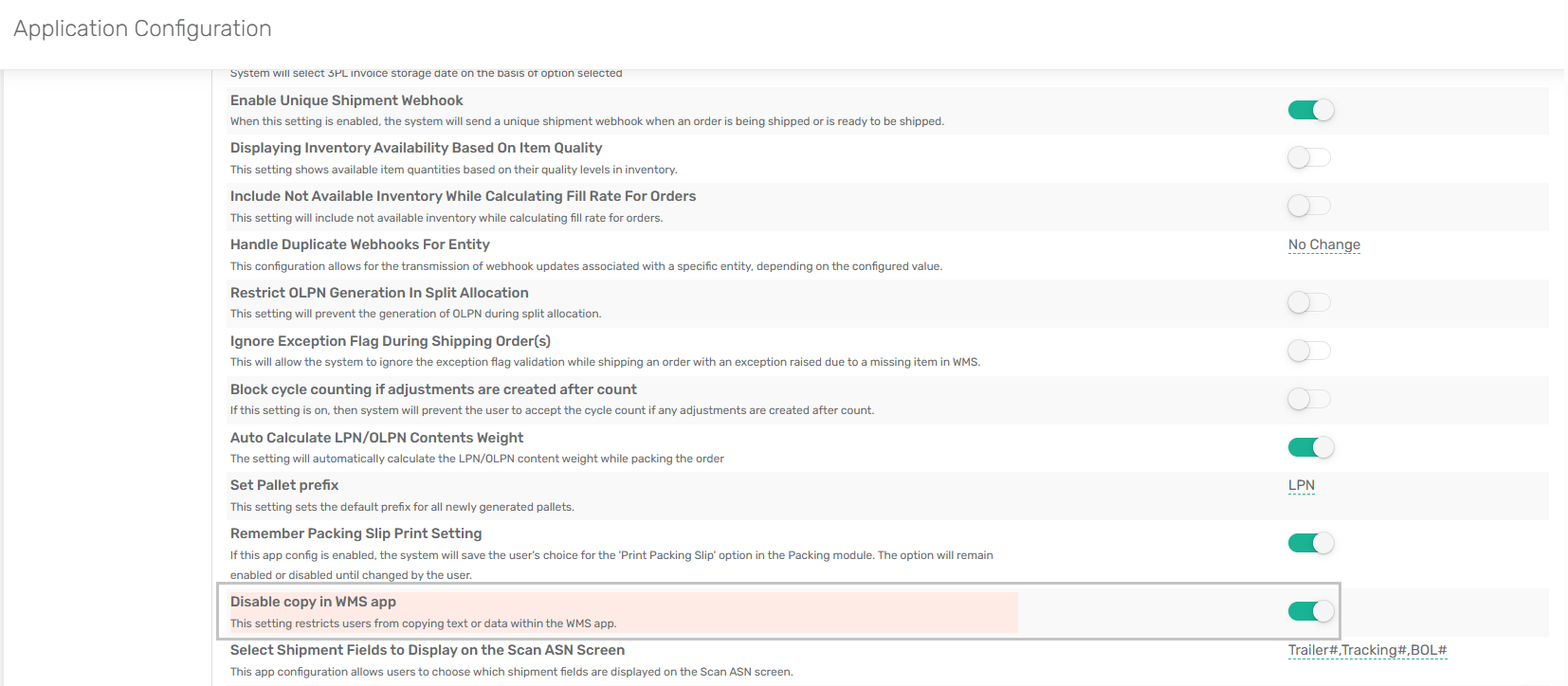
### **New App Configuration – Disable Copy Functionality in WMS**
**Overview**
To address operational control concerns and prevent process circumvention during order picking, a new configuration setting has been introduced in the **Xoro WMS app**. This enhancement provides administrators with the ability to **disable the copy functionality** within the app, while ensuring **barcode scanning remains fully operational**.
***
**Key Enhancement**
**New App Config Setting:**
* **Setting Name:** `Disable copy in WMS app`
* **Location:** App Config → WMS tab
When this setting is enabled:
* **Users will no longer be able to copy text or data** from input fields within the WMS app.
* **Barcode scanning remains unaffected**, ensuring that legitimate operations are not hindered.
***
**Purpose of Enhancement**
This update was driven by customer feedback highlighting that users were **bypassing barcode scanning** by **copy-pasting item data**, particularly in order picking workflows. This behavior resulted in:
* Acceptance of **inaccurate quantities** (e.g., less than inner pack quantities)
* **Shipping discrepancies** due to incomplete validation
* **Reduced adherence to scanning protocol**
By restricting the copy function, this enhancement reinforces **scanning compliance** and promotes **accurate order fulfillment**.
***
**Impact and Considerations**
* This setting is **optional and configurable** based on customer preferences.
* It is **non-intrusive** and does not interfere with barcode scanning, data entry, or operational flow.
* Recommended for warehouses requiring **strict adherence to scanning workflows** and **accuracy in item validation**.
***
For further information or implementation assistance, please refer to the **Xoro Knowledgebase** or contact your Xoro representative.
**Impact and Considerations**
* This setting is **optional and configurable** based on customer preferences.
* It is **non-intrusive** and does not interfere with barcode scanning, data entry, or operational flow.
* Recommended for warehouses requiring **strict adherence to scanning workflows** and **accuracy in item validation**.
---
# Agent Instructions
This documentation is published with GitBook. GitBook is the documentation platform designed so that both humans and AI agents can read, navigate, and reason over technical content effectively. Learn more at gitbook.com.
## Querying This Documentation
If you need additional information that is not directly available in this page, you can query the documentation dynamically by asking a question.
Perform an HTTP GET request on the current page URL with the `ask` query parameter, and the optional `goal` query parameter:
```
GET https://docs.xorosoft.com/whats-new/release-notes/previous-releases/2025/june-2025-release.md?ask=&goal=
```
`ask` is the immediate question: it should be specific, self-contained, and written in natural language.
`goal` is optional and describes the broader end goal you are ultimately trying to accomplish on behalf of the user. GitBook uses it to tailor the answer towards what is most useful for that goal.
The response will contain a direct answer to the question and relevant excerpts and sources from the documentation.
Use this mechanism when the answer is not explicitly present in the current page, you need clarification or additional context, or you want to retrieve related documentation sections.