> For the complete documentation index, see [llms.txt](https://docs.xorosoft.com/llms.txt). Markdown versions of documentation pages are available by appending `.md` to page URLs; this page is available as [Markdown](https://docs.xorosoft.com/xoroerp-1/admin/timesheet-entry-1.md).
# Timesheet Entry
### Overview
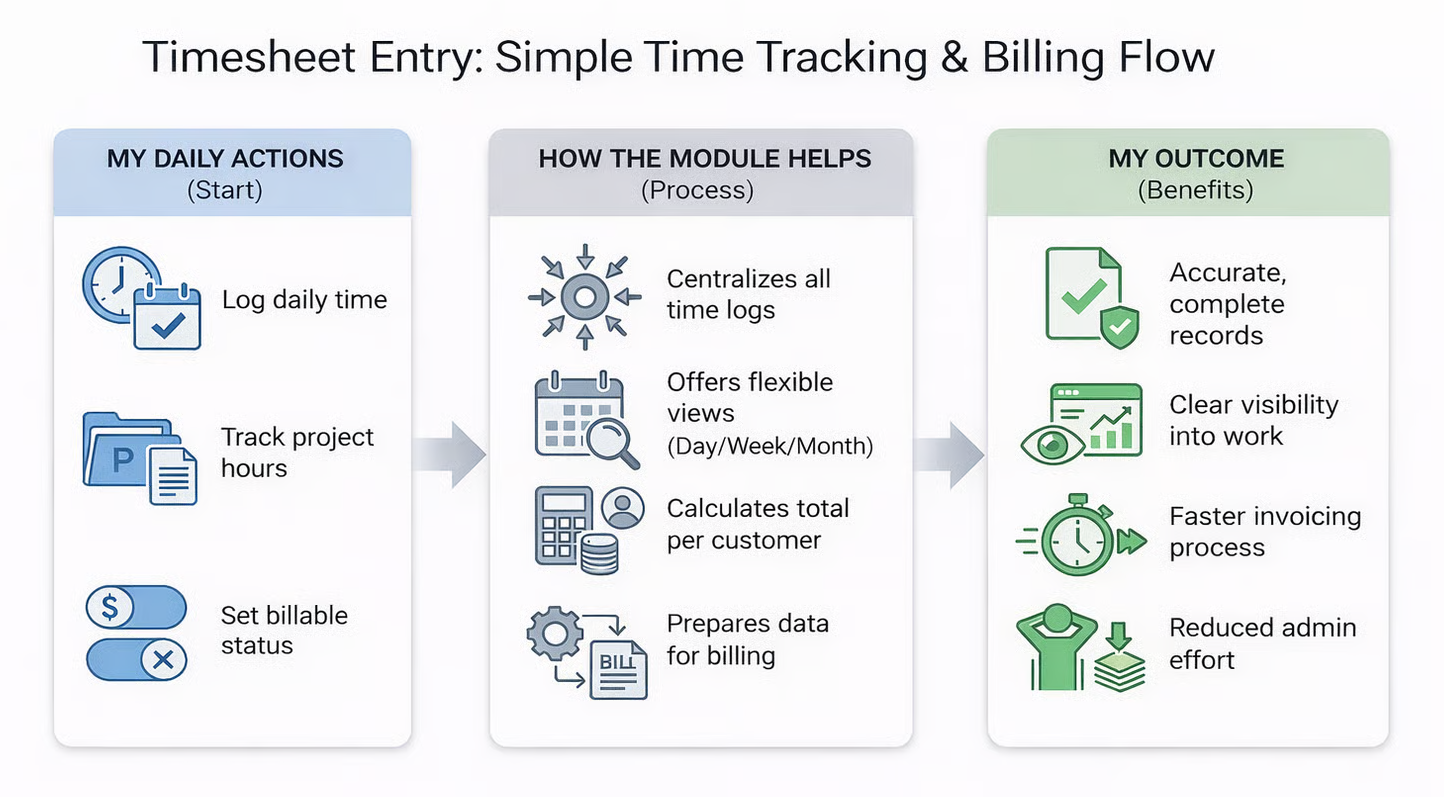
The Timesheet Entry Module serves as the central hub for recording, managing, and billing time-based services in XoroERP. Designed specifically for service and project-based organizations, this module enables teams to log detailed time entries against customers, users, and service items with precision and ease.
Each timesheet entry captures essential information, including service item details, time duration, project or class assignments, descriptive notes, and billable status indicators. This comprehensive data collection ensures that every minute of work is properly documented and can be efficiently converted into accurate client invoices.
The module's intuitive interface allows users to seamlessly switch between different view modes and time periods, making it adaptable to various workflow preferences and reporting requirements. Whether you're tracking individual consultant hours or managing complex project timelines, the Timesheet Entry Module provides the flexibility and functionality needed for professional time management.
#### **Key Benefits:**
* **Accurate time tracking across projects**
* **Streamlined billing processes**
* **Enhanced project visibility**
* **Simplified invoice generation**
### **Accessing and Navigating the Module**
**Navigate to Module**
Access the Timesheet Entry Module by going to **Menu > Admin > Timesheet Entry** from your XoroERP dashboard. This central location ensures consistent access across all user roles.
**User Authentication**
The system automatically recognizes your login credentials. **Xadmin users** see all available users with the top-listed user auto-selected, while **standard users** are automatically assigned to their own timesheet.
**Date and View Selection**
Use the calendar icon to select specific dates and toggle between weekly, or monthly views. Arrow navigation allows quick movement between time periods for efficient timesheet management.

The module's interface is designed for intuitive navigation, with clearly labeled sections and logical workflow progression. The responsive design ensures consistent functionality across different devices and screen sizes, enabling time entry from desktop computers, tablets, and mobile devices as needed for field work or remote operations
### Core Fields and Data Entry Options
**User Selection**
The user field automatically adapts based on your access level. Administrators can select from all system users, while standard users are restricted to their own entries. This security feature ensures data integrity while maintaining appropriate access controls.
**Date and Time Period**
Flexible date selection through an integrated calendar widget allows precise timesheet targeting. The dropdown selector enables switching between weekly and monthly views, while directional arrows provide quick navigation between consecutive periods.
**Service Item Management**
Choose from existing service items via dropdown selection, or create new items on-demand using the '**+**' icon. This dynamic functionality ensures that new service types can be immediately incorporated without workflow interruption.
**Project and Class Assignment**
Categorize entries using project or class designations through dropdown selection. This organizational structure enables detailed reporting and analysis by specific initiatives or client segments.
**Billable Status Toggle**
Mark entries as billable or non- billable using the intuitive toggle switch. This critical feature determines which time entries will be included in invoice generation, providing precise control over billing accuracy.
**Adding and Managing Timesheet Entries**
### Quick Entry Process
#### 1. Click Add Entry
Open the data entry popup window with comprehensive field options for detailed time logging.
#### 2. Complete Required Fields
Fill in service item, duration, project assignment, notes, and billable status as appropriate.
#### 3. Save Entry
Click "**Add**" to save the entry, which immediately appears in your selected view mode.
#### Management Features
 **Delete Function:** Use the Delete key to remove entries quickly and efficiently.
 **Auto-Row Addition:** Empty rows automatically appear after each entry for continuous data input.
 **Table View Editing:** Comprehensive edit and delete options available through action buttons.
 **Real-time Updates:** Changes appear immediately across all view modes.
{% hint style="info" %}
For rapid data entry, the system supports inline editing directly within the Pivot View. Simply type time values, select item numbers, add notes, and press Enter to save entries instantly. This streamlined approach significantly reduces time spent on administrative tasks.
{% endhint %}
{% hint style="info" %}
### Delete function is available only in the Table View mode.
{% endhint %}
### View Modes and Display Options
Toggle between view modes using the header controls to match your current task requirements. Pivot View optimizes overview and summary analysis, while Table View supports detailed record management and precise editing operations. Both modes maintain real-time synchronization, ensuring data consistency regardless of your preferred working style.
* **Pivot View Mode**
The Pivot View presents timesheet data in a summarized format, ideal for analyzing time distribution across users, projects, and service items. This view mode excels at providing high-level insights into team productivity, resource allocation, and project progress.
Interactive features within Pivot View include quick inline editing capabilities, where users can directly modify time values and save changes with a simple Enter keystroke. This functionality bridges the gap between detailed data entry and rapid time logging for improved workflow efficiency.
* **Table View Mode**
Table View offers granular control over individual timesheet entries with comprehensive editing capabilities. Each row represents a distinct time entry with dedicated action buttons for modification or deletion, providing precise control over timesheet accuracy.
This detailed view mode is particularly valuable for administrative review, client billing verification, and compliance documentation. The structured layout ensures clear visibility of all entry components, facilitating thorough quality control and audit trail maintenance.
{% hint style="info" %}
**User Dropdown Behavior**:
* When a **Sales Rep** is logged in, the **User** dropdown in Timesheet Entry will display **only Sales Reps**.
* For other users, the dropdown will display **all available users**.
{% endhint %}
### Invoice Generation Capabilities
### Automated Invoice Creation
The "**Generate Invoice**" function revolutionizes billing efficiency by automatically creating new invoices per customer for all entries marked as billable and unbilled. This comprehensive automation eliminates manual invoice compilation while ensuring complete accuracy in billable hour capture.
The system intelligently groups timesheet entries by customer, calculates total billable hours per service item, and generates professionally formatted invoices ready for client delivery. This process significantly reduces administrative overhead while maintaining detailed audit trails for financial compliance.
### Existing Invoice Integration
The "**Add Selected Lines to Existing Invoice**" feature provides flexibility for complex billing scenarios where timesheet entries need to be incorporated into previously created invoices. Users can select specific entries and append them to existing invoices through an intuitive confirmation modal.
Customer matching validation ensures billing accuracy by requiring identical customer assignments between timesheet entries and target invoices. This security measure prevents billing errors and maintains data integrity throughout the invoicing process.
{% hint style="warning" %}
**Invoice Notes Display**:
* If the invoice is created from a Timesheet Entry, the **Notes** column will display in the format: **Date – User – Notes**.
* For merged lines added via ***Invoice Options (Add Unbilled Lines)***, multiple notes will be separated using **“ | ”**
{% endhint %}
{% hint style="info" %}
**Project Class Assignment**:
* Once a **Project Class** is assigned to a customer, it will remain unchanged for **all future entries** for that customer.
{% endhint %}
#### Streamlined Billing Workflow
Direct invoice generation from timesheet entries eliminates the need for manual consolidation or third-party billing systems, creating a seamless end-to-end process from time tracking to client invoicing.
#### Flexible Invoice Management
Choose between creating new invoices or enhancing existing ones based on your billing requirements and customer preferences, providing maximum operational flexibility.
### Practical Use Cases and Applications
#### Service Teams
Professional service organizations utilize the Timesheet Entry Module to track billable hours across multiple client engagements. Team members can quickly log service delivery time, assign appropriate service items, and ensure accurate client billing through seamless invoice generation.
The module's flexibility accommodates various service delivery models, from consulting and support services to maintenance and project work. Real-time visibility into billable hours enables proactive client communication and accurate project cost management.
#### Project Managers
Project management professionals leverage detailed time tracking capabilities to monitor resource utilization, track project progress, and maintain budget oversight.
The ability to categorize entries by project and class provides comprehensive insights into team allocation and project profitability.
Advanced reporting capabilities enable project managers to identify resource bottlenecks, optimize team assignments, and provide accurate project status updates to stakeholders based on actual time investment data.
#### Finance Teams
Finance departments benefit from automated invoice generation capabilities that eliminate manual timesheet consolidation and reduce billing cycle times. Direct integration between time tracking and invoicing ensures accurate revenue recognition and streamlined accounts receivable management.
The system's audit trail capabilities support financial compliance requirements while providing detailed cost analysis for improved business decision-making and profitability assessment.
#### Consultants and Support Staff
Independent consultants and support professionals use the module to maintain comprehensive time logs for each customer engagement, ensuring all billable efforts are properly documented and invoiced. The system's flexibility accommodates various service delivery models and billing arrangements.
Detailed note-taking capabilities support client communication and project documentation requirements, while automated billing features reduce administrative overhead and improve cash flow management.
### Workflow Integration and Best Practices
#### 1. Daily Time Logging
Establish consistent daily time entry habits to ensure accurate project tracking and minimize end-of-period reconciliation efforts. Regular logging improves data quality and supports real-time project management decisions.
#### 2. Monthly Billing Cycle
Coordinate timesheet finalization with monthly billing cycles to optimize cash flow and maintain consistent client communication regarding service delivery and associated costs.
#### 3. Weekly Review and Validation
Implement weekly timesheet review processes to verify entry accuracy, update billable status designations, and ensure proper project classifications before invoice generation activities.
#### 4. Quarterly Analysis
Leverage accumulated timesheet data for quarterly business analysis, resource planning, and service optimization initiatives based on actual time investment patterns and profitability metrics.
### Integration Benefits
The Timesheet Entry Module seamlessly integrates with XoroERP's broader ecosystem, including customer management, service item catalogs, and financial reporting systems. This integration eliminates data silos and ensures consistent information flow throughout your organization.
Advanced configuration options, such as restricting timesheet minute values to multiples of 5, provide operational flexibility while maintaining data standardization. These customization capabilities enable organizations to align the system with existing business processes and compliance requirements.
---
# Agent Instructions
This documentation is published with GitBook. GitBook is the documentation platform designed so that both humans and AI agents can read, navigate, and reason over technical content effectively. Learn more at gitbook.com.
## Querying This Documentation
If you need additional information that is not directly available in this page, you can query the documentation by asking a question.
Perform an HTTP GET request on the following URL with the `ask` and `goal` query parameters:
```
GET https://docs.xorosoft.com/xoroerp-1/admin/timesheet-entry-1.md?ask=&goal=
```
`ask` is the immediate question: it should be specific, self-contained, and written in natural language.
`goal` is what the user is ultimately trying to achieve, the reason they need the answer. Sharing it helps GitBook give you a better, more relevant answer. A goal is most helpful when it describes the outcome the user wants rather than restating the question. For example, with `ask=how do I create an API token`, a goal like `automate deployments from our CI pipeline` lets GitBook tailor the answer to that use case.
The response will contain a direct answer to the question and relevant excerpts and sources from the documentation.
Use this mechanism when the answer is not explicitly present in the current page, you need clarification or additional context, or you want to retrieve related documentation sections.
.gif?alt=media&token=5b22a663-f84c-440c-aedb-989dca2a6843)
.gif?alt=media&token=a156daa2-9b75-4173-9831-f917e2549e7b)
.gif?alt=media&token=506ef7e4-4bd4-458c-a152-42f9a6617388)

