> For the complete documentation index, see [llms.txt](https://docs.xorosoft.com/llms.txt). Markdown versions of documentation pages are available by appending `.md` to page URLs; this page is available as [Markdown](https://docs.xorosoft.com/xoroerp-1/manufacturing/quality-issue-code/what-is-a-quality-issue-code.md).
# What is a Quality Issue Code?
A **Quality Issue Code** represents a standardized classification used to identify and record defects or quality problems encountered during manufacturing processes. It helps track production issues, enforce quality control, and maintain process-level traceability.
In XoroERP, Quality Issue Codes are used during workstation execution when items or quantities are flagged for quality concerns and moved to quarantine. These codes provide a consistent way to record the reason for defects and support structured resolution and reporting.
By defining Quality Issue Codes, users can effectively record the following:
* Type of production defect or issue
* Reason for quarantining items during manufacturing
* Quality tracking and reporting data
* Process-level quality control information
Quality Issue Codes ensure standardized defect classification, enabling better quality governance and audit tracking.
### Creating a Quality Issue Code
Creating a Quality Issue Code involves defining a unique issue name and corresponding code that represents a specific type of manufacturing defect or quality concern.
#### Entering a Quality Issue Code
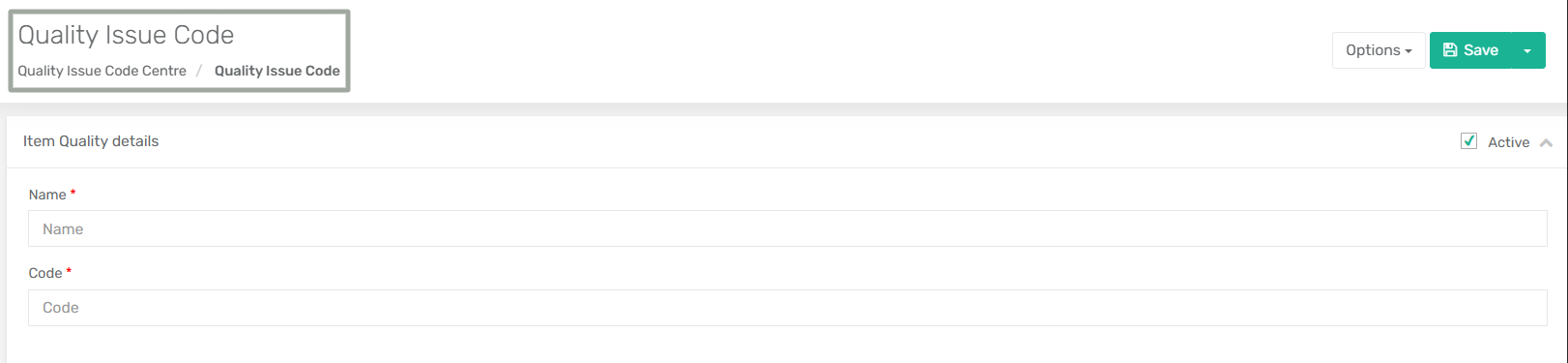
* To create a Quality Issue Code, navigate to **Menu → Manufacturing → Quality Issue Code → Quality Issue Code**.
* The issue can be activated or deactivated based on system requirements by selecting or clearing the **Active** checkbox. Enter the required details and click **Save** to create the record.
* Once saved, the issue becomes available for selection when reporting quality issues during manufacturing execution.
### Quality Issue Code Fields
The following fields are available when creating a Quality Issue Code.
| Field | Description |
| ------ | ---------------------------------------------------------------------------------------------------------------------------------- |
| Name\* | Enter the name of the quality issue. This represents the defect or issue type (for example, Damage, Scratch, Unprocessed Item). |
| Code\* | Enter a unique identifier for the quality issue. This code is used for tracking and classification during manufacturing processes. |
| Active | Indicates whether the quality issue code is active and available for selection during workstation logging and quality reporting. |
### Quality Issue Code Header Level Options
The Quality Issue Code module provides header-level options that allow users to manage the quality issue record. These options are available under the **Options** menu in the top-right corner of the page.
* **Delete:**\
Deletes the selected Quality Issue Code from the system. Once deleted, the record cannot be used for future quality issue reporting.
* **Show Activity:**\
Displays the activity log for the Quality Issue Code, showing the history of changes and user actions performed on the record.
---
# Agent Instructions
This documentation is published with GitBook. GitBook is the documentation platform designed so that both humans and AI agents can read, navigate, and reason over technical content effectively. Learn more at gitbook.com.
## Querying This Documentation
If you need additional information that is not directly available in this page, you can query the documentation by asking a question.
Perform an HTTP GET request on the following URL with the `ask` and `goal` query parameters:
```
GET https://docs.xorosoft.com/xoroerp-1/manufacturing/quality-issue-code/what-is-a-quality-issue-code.md?ask=&goal=
```
`ask` is the immediate question: it should be specific, self-contained, and written in natural language.
`goal` is what the user is ultimately trying to achieve, the reason they need the answer. Sharing it helps GitBook give you a better, more relevant answer. A goal is most helpful when it describes the outcome the user wants rather than restating the question. For example, with `ask=how do I create an API token`, a goal like `automate deployments from our CI pipeline` lets GitBook tailor the answer to that use case.
The response will contain a direct answer to the question and relevant excerpts and sources from the documentation.
Use this mechanism when the answer is not explicitly present in the current page, you need clarification or additional context, or you want to retrieve related documentation sections.