> For the complete documentation index, see [llms.txt](https://docs.xorosoft.com/llms.txt). Markdown versions of documentation pages are available by appending `.md` to page URLs; this page is available as [Markdown](https://docs.xorosoft.com/xoroerp-1/sales/credit-and-deposit/credit-memo/credit-memo-centre.md).
# Credit Memo Centre
### **What is Credit Memo Centre?**
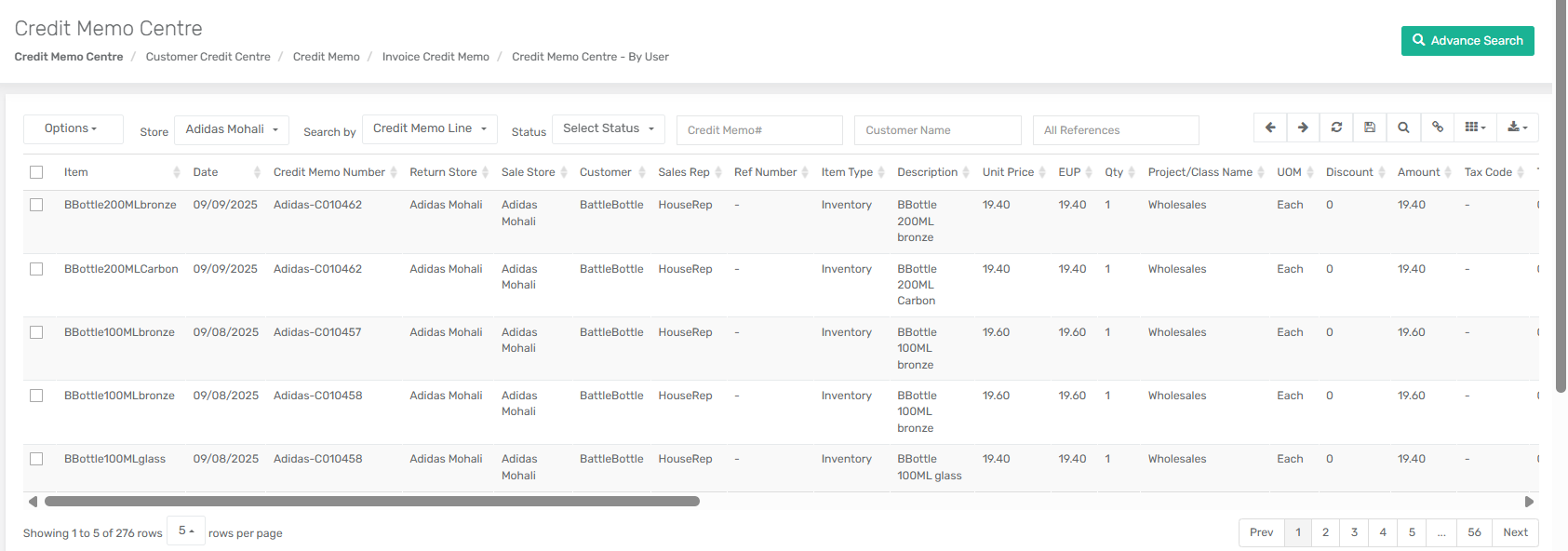
The **Credit Memo Centre** in XoroERP is a centralized module that allows users to manage, track, and process credit memos efficiently. Credit memos are issued when a customer returns goods, when adjustments are needed, or when refunds are processed against sales orders.
**Location in System:**\
`Menu > Sales > Credit & Deposit > Credit Memo Centre`
This module helps businesses keep accurate financial records, issue refunds, apply credits to invoices, and ensure that all transactions related to customer credits are properly accounted for.
***
### **Fields and Options**
#### **Header Options (Dropdown)**
* **Print** – Print the selected credit memo.
* **Add to Email Queue** – Add the credit memo to the system’s email queue for sending.
* **Show Transactions** – View the journal transactions linked to the credit memo.
* **Batch Delete** – Delete multiple selected credit memos at once.
***
#### **Header Filter Fields**
* **Store** – Dropdown list of all stores in the system; users can filter credit memos by selecting the relevant store.
* **Search By** – Dropdown with two options:
* **Credit Memo Header** – Search by header-level details.
* **Credit Memo Line** – Search by line-level details (items, quantities, etc.).
* **Status** – Dropdown of credit memo statuses:
* Open
* Partially Applied
* Applied
* Void
* Partially Refunded
* Refunded
* Transferred
* Partially Transferred
***
#### **Header Search Fields**
* **Credit Memo#** – Unique identifier for the credit memo.
* **Customer Name** – Filter credit memos by customer.
* **All References** – Search across references (order, invoice, etc.).
* **Parent Customer:** Filter credit memos by selecting a parent customer. The results include records for the selected parent customer as well as all associated child and grandchild customers. If no hierarchy exists, only the selected customer's credit memos are displayed.
***
#### **Context View (Right-Click Options)**
*(Functional when “Credit Memo Header” is selected in Search By field)*
* **Open** – Open the selected credit memo in detail view.
* **Refund Balance** – Opens a popup for *Customer Refund* to issue refunds against the credit.
* **Apply on Invoice** – Opens *Apply Credit/Deposit* module to apply credits on invoices.
* **Show Applied on Invoice(s)** – Displays all invoices where the credit has been applied.
* **Show Refund(s) from Credit** – Shows refunds that have been issued from the credit memo.
* **Show Credit Transfers** – Displays details of credits transferred between entities.
* **Show Transactions** – Opens the *Journal Transaction View* to see accounting entries.
* **Show Serial Number(s)** – Lists serial numbers tied to returned items.
* **Show Activity** – Displays the activity log of the credit memo.
* **Edit in New Window** – Opens the credit memo in a separate window for editing.
***
#### **Header Icons**
* **Refresh** – Reload the data.
* **Save** – Save any changes.
* **Search** – Execute a search based on filter criteria.
* **Copy Link** – Generate a shareable link to the credit memo.
* **Columns**
| **Column** | **Description** |
| -------------------------- | --------------------------------------------------------------------------------------------------------------- |
| Date | The date when the credit memo was created. |
| Credit Memo Number | Unique identifier assigned to the credit memo. |
| Return Store | The store where the returned goods were received. |
| Sale Store | The store where the original sale took place. |
| Customer | Name of the customer associated with the credit memo. |
| Sales Rep | Sales representative linked to the transaction. |
| Ref Number | Reference number (invoice, order, or related doc). |
| Item Type | Type/category of item (e.g., product, service). |
| Item | The returned item or product code. |
| Description | Details of the returned item. |
| Unit Price | Price per unit of the item. |
| EUP | Extended Unit Price (line-level calculation). |
| Qty | Quantity of items returned. |
| Project/Class Name | Project or class associated with the transaction. |
| UOM | Unit of Measure (e.g., pcs, kg). |
| Discount | Discount applied to the item. |
| Amount | Total credit amount for the line. |
| Tax Code | Tax code applied on the item. |
| Tax Amount | Tax amount credited back. |
| Return Code | Code indicating reason for return. |
| Return Notes | Notes about the return. |
| RMA# | Return Merchandise Authorization number. |
| ASN# | Advance Shipping Notice number if applicable. |
| Charge Code | Any charge code applied (e.g., restocking fee). |
| Alternative Number 1 | Custom alternative item reference. |
| Alternative Number 2 | Additional custom reference. |
| Alternative Number 3 | Third custom reference. |
| Item Category | The category of the returned item. |
| Item SubCategory | The subcategory of the returned item. |
| Item Income Return Account | GL account used for credit/return posting. |
| Custom Price 1–5 | User-defined custom pricing fields for flexibility. |
| Email Sent? | Indicates whether an email notification was successfully sent to the customer upon creation of the credit memo. |
### **Use Cases**
* **Refund Management** – Businesses can issue refunds directly from credit memos.
* **Applying Credits** – Credits can be applied to open invoices, reducing outstanding customer balances.
* **Returns Tracking** – Easily track returned items, reasons, and related authorizations (RMA/ASN).
* **Financial Reconciliation** – Journal transactions provide accurate financial records.
* **Multi-Store Handling** – Filter and manage credit memos across different stores.
---
# Agent Instructions
This documentation is published with GitBook. GitBook is the documentation platform designed so that both humans and AI agents can read, navigate, and reason over technical content effectively. Learn more at gitbook.com.
## Querying This Documentation
If you need additional information that is not directly available in this page, you can query the documentation dynamically by asking a question.
Perform an HTTP GET request on the current page URL with the `ask` query parameter, and the optional `goal` query parameter:
```
GET https://docs.xorosoft.com/xoroerp-1/sales/credit-and-deposit/credit-memo/credit-memo-centre.md?ask=&goal=
```
`ask` is the immediate question: it should be specific, self-contained, and written in natural language.
`goal` is optional and describes the broader end goal you are ultimately trying to accomplish on behalf of the user. GitBook uses it to tailor the answer towards what is most useful for that goal.
The response will contain a direct answer to the question and relevant excerpts and sources from the documentation.
Use this mechanism when the answer is not explicitly present in the current page, you need clarification or additional context, or you want to retrieve related documentation sections.